Digital information has a habit of spreading out. Website details sit in one account, search figures in another, social results somewhere else and important files in an old email thread. By the time everything has been found, there is little time left to understand what it means.
A useful monthly review does not need to cover every available metric. Start with seven signals that show how people are finding, visiting and responding to your business online. Viewed together, they can help you spot changes and ask better questions, without treating a single number as proof of success.
Why scattered digital information wastes time
Separate platforms are often necessary, but repeatedly hunting for passwords, reports and documents creates avoidable admin. It can also make performance harder to understand because figures are checked at different times or without the information needed to interpret them.
Keeping key details together creates a clearer routine. You can review the same signals each month, compare like with like and investigate changes while the context is still fresh. That is more useful than opening a dashboard only when something appears to have gone wrong.
Start with seven signals, not every number
Analytics platforms can show hundreds of measurements. Many are helpful for detailed investigation, but they do not all belong in a regular business overview. A short set of consistent signals is easier to review and more likely to lead to a sensible next step.
The seven signals below cover four connected areas: website response, website use, search visibility and clicks, social distribution and interaction, and Google reviews. None should be judged in isolation. Together, they provide a practical starting point rather than a final verdict.
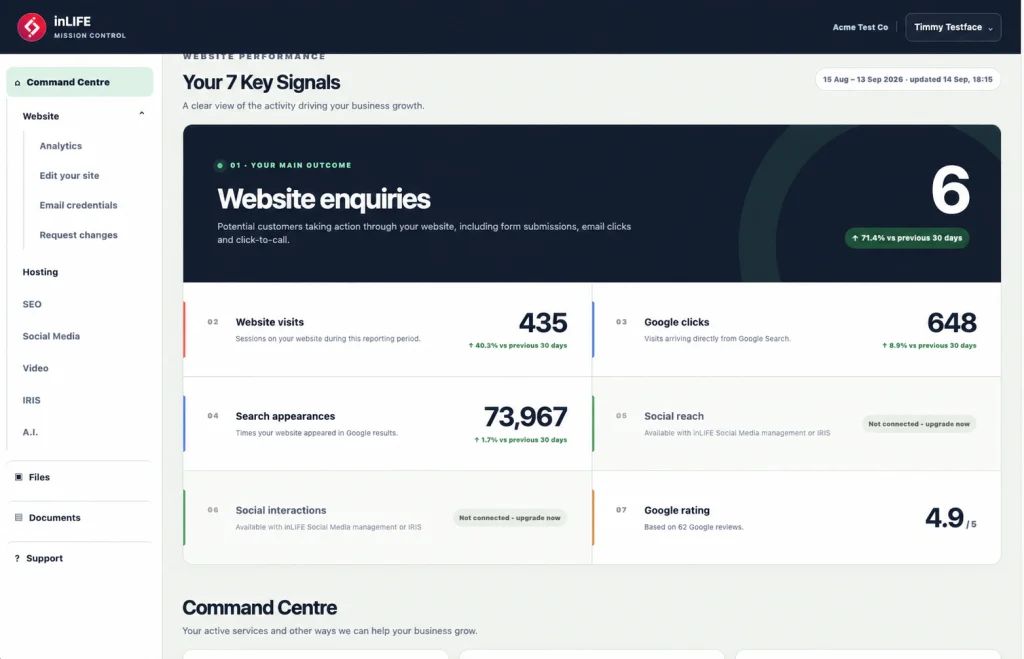
1. Website enquiries
Website enquiries show how many tracked contact actions have taken place. Depending on the website setup, these might include completed enquiry forms, booking requests or other defined contact actions. Tracking needs to be configured correctly before the figure can be trusted.
An enquiry is not automatically a new customer or sale. The total may contain spam, duplicate messages, supplier approaches, recruitment enquiries or contacts that are not commercially relevant. Review the number alongside the nature and quality of the messages received.
If enquiries change noticeably, check that forms and tracking are working before drawing conclusions. Then look at traffic sources, popular landing pages and any recent changes to the website or marketing. Effective tracking should also be considered when planning new web design services, rather than added as an afterthought.
2. Website users
Website users indicate how many users analytics software has recorded during a chosen period. In Google Analytics 4, reports may focus on active users, meaning people whose visits met specific engagement conditions.
This is more useful than describing the figure as an exact count of individual people. One person may visit on several devices or browsers, while consent choices and tracking restrictions can affect what is recorded. A user figure is therefore an informed measurement, not a perfect headcount.
Look at the monthly trend and the surrounding context. A rise in users can show that more recorded visitors are reaching the site, but it does not tell you whether they were relevant, found what they needed or made contact. Enquiries, page activity and traffic sources help complete the picture.
3. Google clicks and 4. search impressions
Google Search Console separates visibility from visits. A search impression is recorded when a link to the website appears in Google Search results under Google's reporting rules. A click is recorded when someone selects that result and visits the website.
Impressions can suggest that Google is showing the site for more searches, but they are not the same as rankings, website visits or enquiries. One searcher may create more than one impression, and a result can appear without attracting a click.
Clicks show that search visibility has led to a website visit, although they still do not prove that the visitor became a customer. When impressions rise but clicks do not, investigate which searches and pages are responsible. The result may need a more relevant page title or description, or the site may be appearing for searches that are not a good fit.
When clicks and impressions fall, compare the same date ranges and account for seasonality, promotions, site changes and demand. Wedding, leisure and tourism businesses, for example, may see meaningful patterns across seasons that a single month cannot explain.
5. Social reach and 6. social interactions
Social reach generally indicates how many accounts or people a platform estimates have seen a piece of content. Social interactions record responses such as reactions, comments, shares or saves, depending on what the connected platform includes.
Definitions vary between social networks, so figures should be labelled by platform and compared consistently. Combining several networks into one total can hide useful differences unless the method is clear. A smaller relevant audience may respond more strongly than a much larger general one.
Reach helps you understand distribution. Interactions show that people took some form of action after seeing the content. Neither figure proves that social activity generated an enquiry or sale. To explore that connection, look for referral traffic, tracked contact actions and genuine messages alongside the platform data.
7. Google rating
A Google rating is the average star score attached to a Business Profile. The average matters, but so do the number, recency and substance of the reviews behind it. A high score based on a very small number of reviews gives different context from an established pattern of customer feedback.
Reviews can help potential customers assess a business before getting in touch. Thoughtful responses also show that feedback is being read. Responses should remain polite, specific and careful not to disclose private customer information.
Google states that local results are mainly based on relevance, distance and prominence, with review count and scores contributing to local ranking. A strong rating may therefore support local visibility, but it cannot guarantee a particular position or wider SEO result. It is one part of a broader online presence.
One connected place to check, act and ask for help
The inLIFE Mission Control client portal brings inLIFE-managed website, hosting, marketing, files and support information into one organised place. Clients with access can find important details, view key performance information, keep documents together and contact the people looking after their services without piecing everything together from separate email threads.
That connection is useful because a figure is often only the beginning. If enquiries have dropped, you may need to check tracking or request a website change. If search impressions have shifted, you may want to inspect the relevant queries and pages. Keeping the information and support route together makes the next step easier to find.
Mission Control also provides app access. The portal page currently lists an iOS download and states that Android is coming soon. Availability should be checked before downloading or relying on a particular mobile platform.
Use trends to guide the next question
The most useful monthly review compares consistent periods and asks what changed. Avoid reacting to a single figure before checking the timeframe, tracking setup and business context.
A practical review might consider the following questions.
- Did website enquiries change, and were the contacts genuine and relevant?
- Did recorded users change alongside enquiries, or did the relationship between the two shift?
- Are Google impressions and clicks moving in the same direction?
- Which social platforms increased reach, and which content attracted meaningful interactions?
- Has the Google rating or review volume changed, and have recent reviews received an appropriate response?
- Were there seasonal factors, campaigns, website updates or tracking changes that could explain the pattern?
Seven signals will not explain every detail of your digital performance, but they create a manageable monthly view. Website enquiries show response, user figures show recorded use, search data shows visibility and clicks, social figures show distribution and reaction, and reviews provide customer feedback and local context.
The aim is not to chase every upward movement or panic at every dip. It is to spot patterns, understand what each figure can genuinely tell you and know where to look next.
If you would like a clearer view of your website, search and social activity, speak to the inLIFE team about the support that suits your business.